Script Framework and Basic Syntax#
Through a simple built-in strategy example MovAvg2Line Cross LE (a two moving average golden cross buying strategy), quickly understand the framework and basic syntax of a script.
Open PowerLanguage Editor -> File -> Open -> Study Type -> Signal (checked) -> MovAvg2Line Cross LE.
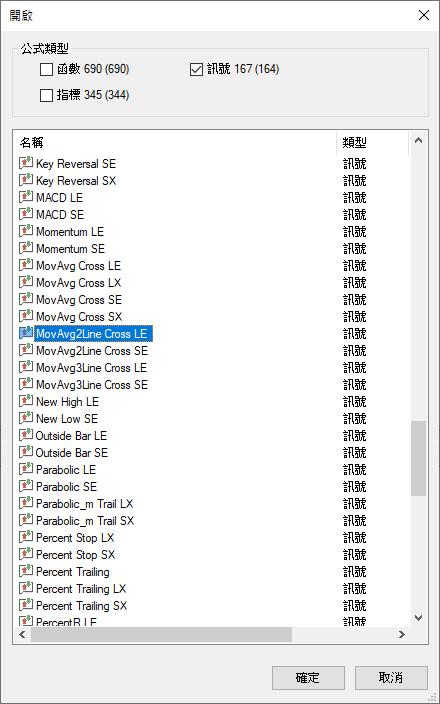
Source code of MovAvg2Line Cross LE:
| |
Framework Overview#
The framework of a script consists of four parts:
| Framework | Description | Corresponding Lines |
|---|---|---|
| I. Declaration | Declare inputs and variables | Lines 1-2 |
| II. Rules Calculation | Use functions to calculate indicator values and assign to variables | Lines 4-5 |
| III. Entry and Exit Condition | Compose logical conditions and use if branch syntax to evaluate | Lines 7-8 |
| IV. Buy or Sell | Execute buy and sell order instructions | Line 9 |
I. Declaration#
Inputs and Variables#
Inputs and variables can be thought of as containers (e.g., a bottle) that store the desired data (e.g., 5 liters). Before using a container, you need to declare it first. The declaration tells the compiler the type of data to be stored, and the type determines which operations can be performed on the data (e.g., arithmetic operations or string concatenation).
Therefore, inputs and variables are divided into declaration and use phases:
- Declaration: Declare the name of the input or variable, give a default value or initial value, which defines the type. The type can be Numerical, String, or TrueFalse.
- Use: Use the name of the input or variable in the code. When the program executes to the name, it uses the stored value.
Input Declaration Syntax#
| |
Inputs: Declare inputs.
InputName: The name of the input. The name is not case-sensitive and cannot start with a number or a period (.).
DefaultValue: The default value of the input. The default value determines the type.
Note: A semicolon (;) must be added at the end of the declaration. Omitting it will cause a compilation error.
Input values can only be set through the default value. They cannot be changed through code in the script. You can set a new default value from MultiCharts without recompiling.
See Input and Variable for details.
MovAvg2Line Cross LE, line 1:
| |
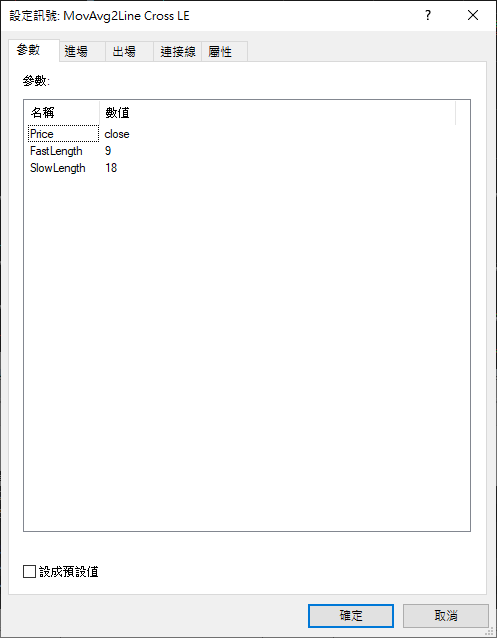
Three inputs are declared:
| Input Name | Default Value | Description |
|---|---|---|
Price | Close (closing price) | The price used for moving average calculation |
FastLength | 9 | Number of bars for the fast moving average |
SlowLength | 18 | Number of bars for the slow moving average |
The image below shows these three inputs and their default values in MultiCharts -> Settings -> Signal -> MovAvg2Line Cross LE -> Settings. Since no values were modified from MultiCharts, the default values defined in the script are used.
Variable Declaration Syntax#
| |
Variables: Declare variables.
VariableName: The name of the variable. The name can be composed of letters, underscores, numbers, and periods (.). The name is not case-sensitive and cannot start with a number or a period (.).
InitialValue: The initial value of the variable. The initial value determines the type.
Note: A semicolon (;) must be added at the end of the declaration. Omitting it will cause a compilation error.
After setting the initial value, the variable value can be changed through code in the script (assign other values). This is the main difference between variables and inputs.
See Input and Variable for details.
MovAvg2Line Cross LE, line 2:
| |
Two variables are declared: var0 and var1, both with an initial value of 0.
Reserved Word#
Reserved words are words in PowerLanguage that have special meaning. They cannot be used as input or variable names.
For example:
InputsandVariablesare syntax reserved words used for declarations.Close(closing price),Open(opening price),High(highest price), andLow(lowest price) are reserved words representing prices.
PowerLanguage has many other reserved words. You can look them up as you encounter them.
II. Rules Calculation#
Function#
Similar to inputs and variables, a function can be thought of as a container, but it stores a sequence of code instead of a value. When you want to reuse that code, you don’t need to rewrite it — just use the function name, and the program will execute the corresponding code.
Functions are divided into two phases:
- Definition (Implementation): Write and compile the code to be used as a function. See Function for details.
- Use (Call): Use the function name and provide input values. When the program executes the function name, it substitutes the input values and executes the corresponding code.
Since this article is an introductory overview, only the use (call) of functions will be explained here.
Function Call Syntax#
| |
FunctionName: The name of the function to use.
input: The value passed to the function’s input.
PowerLanguage provides many built-in functions for common functionalities. AverageFC(PriceValue, Len) is one of them, which calculates the average value of PriceValue over Len bars.
MovAvg2Line Cross LE, lines 4-5:
| |
Price, FastLength, and SlowLength are the inputs declared in line 1. Substituting the default values:
| Code | Substituted | Meaning |
|---|---|---|
AverageFC(Price, FastLength) | AverageFC(Close, 9) | Calculate the average of closing prices over 9 bars |
AverageFC(Price, SlowLength) | AverageFC(Close, 18) | Calculate the average of closing prices over 18 bars |
As described in How MultiCharts Executes Strategy, the script is executed once at the end of each bar, so the average is recalculated each time. This is essentially a Moving Average calculation. Therefore, var0 is 9MA (fast line) and var1 is 18MA (slow line).
Assignment#
In PowerLanguage, the equal sign (=) has two meanings:
| Meaning | Usage |
|---|---|
| Assignment | In general, the right side of = is calculated first, then the result is assigned to the left side |
| Equal | When used with conditional reserved words (e.g., if, else if, while), it means mathematical equality |
Here is a simple example:
| |
The first line declares the variables. The second line BottleA = BottleB + BottleC; — from a mathematical point of view: the value of BottleA is 5, and BottleB + BottleC is 8. How can 5 equal 8?
Because the = here does not mean “equal” but “assignment”:
Calculate the right side first: BottleB(3) + BottleC(5) = 8, then assign 8 to BottleA. The original value (5) of BottleA is overwritten, becoming 8.
MovAvg2Line Cross LE, lines 4-5:
| |
The result of AverageFC(Price, FastLength) is assigned to var0, and the result of AverageFC(Price, SlowLength) is assigned to var1.
From the previous section, var0 is the fast line (9MA) and var1 is the slow line (18MA).
III. Entry and Exit Condition#
Branch#
PowerLanguage provides the if branch syntax to determine the direction of program execution: when certain conditions are met, specific instructions are executed; otherwise, other instructions are executed.
This involves two steps:
- Use logical operators (Logical Operators) to compose a logical expression (Logical Expression).
- Combine the logical expression with the
ifbranch syntax to determine the execution direction.
Logical Operator#
| Operator | Description |
|---|---|
and | When both sides are true, returns true; otherwise returns false |
or | When at least one side is true, returns true; otherwise returns false |
Logical Expression#
A logical expression is a statement that returns a TrueFalse type value.
| Example | Description | Value |
|---|---|---|
5 < 3 | 5 is less than 3 | false |
8 <> 9 | 8 is not equal to 9 | true |
8 <> 9 and 5 < 3 | 8 is not equal to 9 and 5 is less than 3 | false |
Step 1: Compose the Logical Expression#
MovAvg2Line Cross LE, line 7:
| |
The equal sign (=) here means assignment, so the right side is evaluated first. CurrentBar > 1 and var0 crosses over var1 is a logical expression:
CurrentBaris a reserved word that returns the number of the current bar (counting from the first bar after Maximum Bars Back). For now, you can regardCurrentBar > 1astrue— it does not affect the understanding of this strategy.crosses overis a reserved word meaning upward crossing (golden cross).
Therefore, the right side of = can be understood as:
var0 (fast line) crosses above var1 (slow line)
Condition1 is a built-in variable in PowerLanguage that can be used directly without declaration. This line assigns the result of the logical evaluation to Condition1.
Note:
Condition1is a built-in variable. Using it is not recommended because the name is not descriptive. It is recommended to declare meaningful variable names, such asGoldenCross.
Step 2: Combine Logical Expression with if Branch Syntax#
if branch syntax:
| |
E: Logical expression.
I1: Instruction to execute when the logical expression is true.
MovAvg2Line Cross LE, lines 8-9:
| |
If Condition1 is true (i.e., the fast line crosses above the slow line), then execute Buy("MA2CrossLE") next bar at market;.
See Branch for details.
IV. Buy or Sell#
Buy and Sell Instructions#
PowerLanguage provides four buy and sell order instructions: Buy, Sell, SellShort, and BuyToCover.
When MultiCharts executes these instructions, it sends out an order.
Buy Syntax#
| |
EntryLabel: Name the entry. The entry name will be displayed on the chart. When selling, you can use the entry name to specify which entry to sell.
[] indicates an optional parameter. The default names are “Buy”, “Buy#2”, “Buy#3”, and so on.
TradeSize: Specify the number of shares (contracts).
[] indicates an optional parameter. The default uses the value set in Settings -> Strategy Properties -> Properties -> Fixed Shares (Contracts).
OrderCommandType: Specify the order timing and price.
After the buy instruction sends the order, if the order is not filled by the end of the bar, the order will be cancelled.
MovAvg2Line Cross LE, line 9:
| |
next bar: Reserved word, indicating the next bar.at: Reserved word (skip word) with no actual meaning. It simply improves readability and can be omitted.market: Reserved word, representing a market order.
This line means: Buy at the market price on the next bar, and name this entry “MA2CrossLE”.
See Buy and Sell for details.
Conclusion#
This article uses the built-in script MovAvg2Line Cross LE to introduce the four framework parts of a script:
| Framework | Description |
|---|---|
| I. Declaration | Declare inputs and variables |
| II. Rules Calculation | Use functions to calculate and store results through assignment |
| III. Entry and Exit Condition | Use logical expressions and if branch syntax to evaluate entry and exit conditions |
| IV. Buy or Sell | Use buy and sell instructions (Buy/Sell/SellShort/BuyToCover) to send orders |
Appendix: Comment#
Comments are used to improve the readability of code by explaining the purpose of certain code sections. The program skips comments during execution — they do not affect the program’s logic.
MovAvg2Line Cross LE does not use comments, but they are included here for completeness.
Single-line Comment#
Use // to start a comment. Everything from // to the end of the line is treated as a comment.
| |
Multi-line Comment#
Use { to start and } to end a comment. Everything between them is treated as a comment.
| |
Reference#
https://www.multicharts.com/trading-software/index.php?title=Category:Declaration
https://www.multicharts.com/trading-software/index.php?title=Input
https://www.multicharts.com/trading-software/index.php?title=Variable
https://www.multicharts.com/trading-software/index.php?title=Category:Comparisons_and_Loops
https://www.multicharts.com/trading-software/index.php?title=If
https://www.multicharts.com/trading-software/index.php?title=Category:Strategy_Orders
https://www.multicharts.com/trading-software/index.php?title=Buy