Function#
A function, like inputs and variables, can be thought of as a container. Instead of storing values, this container stores a block of code designed to perform a specific task. A function can accept input parameters, process them, and return a result. Commonly used functionalities are usually written as functions, so there is no need to rewrite the same calculations or features every time — just use the corresponding function name.
Functions, like inputs and variables, are divided into two phases:
- Definition (Implementation): Write and compile the code to be used as a function.
- Usage (Calling): Use the function name and provide arguments to the function.
Defining a Function#
Creating a New Function Script#
PowerLanguage Editor -> File -> New File -> Function
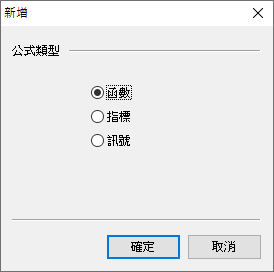
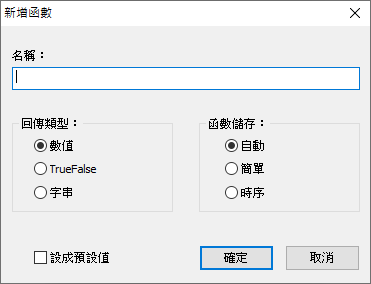
Return Type determines the type of the function’s return value, divided into Numerical (Numeric), TrueFalse, and String. Function Storage further determines whether the return type is Simple or Series, see Function Input Types for details.
Syntax#
| |
| Syntax Element | Optional | Description |
|---|---|---|
Input | Optional | Declares the function’s inputs. Synonym: Inputs |
InputName | Required | The name of the input |
InputType | Required | The type of the input, see Function Input Types |
FunctionName = ReturnValue | Optional | Specifies the function’s return value as ReturnValue |
Function inputs are different from signal script or indicator script inputs; values cannot be passed from MultiCharts. Function inputs are provided when using (calling) the function.
After writing the function, click the compile button to compile the code. If there are no errors, the function can be used in signal or indicator scripts.
Function Input Types#
Each input type has Numerical (Numeric), String, and TrueFalse versions. Based on the suffix, they are divided into the following 6 categories:
| Suffix | Description |
|---|---|
Simple | The value is the same for every bar, no historical values |
Series | The value may differ between bars, has historical values that can be referenced |
| (No suffix) | Accepts either Simple or Series |
Ref | Passing by Reference, if the input value is changed within the function, the argument’s value also changes |
Array | Passes an Array. M represents the maximum index value for each dimension of the passed array |
ArrayRef | Passing by Reference for arrays, if the input value is changed within the function, the argument’s value also changes |
Numeric#
| Type | Description | Syntax Example |
|---|---|---|
NumericSimple | Simple Numerical | Input: Length(NumericSimple); |
NumericSeries | Series Numerical | Input: Price(NumericSeries); |
Numeric | Accepts NumericSimple or NumericSeries | Input: Length(Numeric); |
NumericRef | Numerical Passing by Reference | Input: BarCount(NumericRef); |
NumericArray | Numerical Array | Input: Table[X, Y, Z](NumericArray); |
NumericArrayRef | Numerical Array Passing by Reference | Input: Table[X, Y, Z](NumericArrayRef); |
String#
| Type | Description | Syntax Example |
|---|---|---|
StringSimple | Simple String | Input: Name(StringSimple); |
StringSeries | Series String | Input: Messages(StringSeries); |
String | Accepts StringSimple or StringSeries | Input: Name(String); |
StringRef | String Passing by Reference | Input: Message(StringRef); |
StringArray | String Array | Input: MessageTable[X, Y, Z](StringArray); |
StringArrayRef | String Array Passing by Reference | Input: CommentsTable[X, Y, Z](StringArrayRef); |
TrueFalse#
| Type | Description | Syntax Example |
|---|---|---|
TrueFalseSimple | Simple TrueFalse | Input: Overnight(TrueFalseSimple); |
TrueFalseSeries | Series TrueFalse | Input: UpTrend(TrueFalseSeries); |
TrueFalse | Accepts TrueFalseSimple or TrueFalseSeries | Input: Overnight(TrueFalse); |
TrueFalseRef | TrueFalse Passing by Reference | Input: Flag(TrueFalseRef); |
TrueFalseArray | TrueFalse Array | Input: FlagTable[X, Y, Z](TrueFalseArray); |
TrueFalseArrayRef | TrueFalse Array Passing by Reference | Input: TrendTable[X, Y, Z](TrueFalseArrayRef); |
Using a Function#
Syntax#
| |
| Syntax Element | Description |
|---|---|
FunctionName | The name of the function to use |
Argument | The value passed to the input when calling the function, called an argument |
Example#
Implementation of the built-in function AverageFC:
File -> Open File -> Function (check the checkbox) -> AverageFC
| |
AverageFC is itself a function implementation that also calls another function SummationFC to complete its functionality. AverageFC declares two inputs: PriceValue of type NumericSeries and Len of type NumericSimple. It then calls the SummationFC function to perform calculations, with PriceValue and Len passed as arguments to SummationFC’s inputs. Finally, AverageFC returns the result of the SummationFC calculation divided by Len.
Passing by Value and Passing by Reference#
Argument#
An argument is the value placed at the function’s input position when calling a function, passed to the function for use.
There are two mechanisms for passing arguments to inputs:
- Passing by Value
- Passing by Reference
Passing by Value#
Input types without a Ref suffix use Passing by Value.
Function inputs using Passing by Value cannot have their values changed within the function implementation. Attempting to change the input value within the function will cause compile error: Array, variable or refinput expected.
Example#
The inputs ValueA(NumericSimple) and ValueB(NumericSimple) of the function swapByValFunc are Passing by Value. Attempting to change the values of ValueA and ValueB causes compile error: Array, variable or refinput expected.
Function: swapByValFunc#
| |
Passing by Reference#
Input types with a Ref suffix use Passing by Reference.
Function inputs using Passing by Reference can have their values changed within the function implementation. If the input value is changed within the function, the argument’s value also changes.
The application of Passing by Reference is to allow a function to have multiple outputs. Since the original function syntax only has one return value, a function can only have one output. When a function needs multiple outputs, Passing by Reference can be used to achieve this.
Example#
The inputs ValueA(NumericRef) and ValueB(NumericRef) of the function swapByRefFunc are Passing by Reference. swapByRefFunc swaps the values of inputs ValueA and ValueB. In the signal testSwapFunc, after calling swapByRefFunc, the values of ValueA and ValueB are swapped.
Function: swapByRefFunc#
| |
Signal: testSwapFunc#
| |
Reference#
https://www.multicharts.com/trading-software/index.php?title=Category:Declaration
https://www.multicharts.com/trading-software/index.php?title=Passing_values_to_and_from_a_function