Stop Loss and Profit Target#
Risk management is the most critical part of any trading strategy. Beyond manually coding exit conditions with Sell / BuyToCover, PowerLanguage provides 5 built-in risk management functions that automatically exit a position when it reaches a specified loss or profit amount:
| Function | Description |
|---|---|
SetStopLoss | Fixed stop loss: exits when position loss reaches the specified amount |
SetProfitTarget | Fixed profit target: exits when position profit reaches the specified amount |
SetBreakEven | Break-even stop: once profit reaches a threshold, moves the stop to the entry price |
SetDollarTrailing | Trailing stop (fixed amount): exits when profit falls from its peak by the specified amount |
SetPercentTrailing | Trailing stop (percentage): exits when profit falls from its peak by the specified percentage of that peak |
Common characteristics of all 5 functions:
- Applies to both long and short automatically: No need to write separate logic for long and short positions — the functions automatically calculate stop and target prices based on the current position direction
- Whole position by default: Applied to the entire position (sum of all contracts), not per contract. To switch to per-contract mode, call
SetStopContractfirst - Intrabar evaluation: All 5 functions are evaluated intrabar — they monitor continuously within each bar and can trigger an exit on the same bar as the entry
Converting Points to Currency#
The Amount parameter uses currency units (USD, EUR, etc.). To set a stop in points, multiply by BigPointValue:
Amount = Points × BigPointValueCommon BigPointValue values:
| Instrument | BigPointValue |
|---|---|
| E-mini S&P 500 (ES) | $50 / point |
| E-mini Nasdaq-100 (NQ) | $20 / point |
| Micro E-mini S&P 500 (MES) | $5 / point |
Example: E-mini S&P 500 (ES), 1 contract, 10-point stop = SetStopLoss(10 * BigPointValue) = SetStopLoss(500)
Use BigPointValue in your code rather than hard-coding the multiplier so your strategy works across different instruments.
SetStopLoss#
SetStopLoss sets a fixed stop loss: when the position loss reaches Amount, a Stop order is sent to exit.
Syntax#
| |
| Parameter | Description |
|---|---|
Amount | Maximum allowable loss for the entire position in currency. Long stop price = EntryPrice - Amount / BigPointValue; Short stop price = EntryPrice + Amount / BigPointValue |
Example#
E-mini S&P 500 (ES), 1 contract, 10-point ($500) fixed stop loss:
| |
Place
SetStopLossat the top level of your script — no need to wrap it in anIfcondition. The function automatically applies to the current position on every bar execution.
SetProfitTarget#
SetProfitTarget sets a fixed profit target: when the position profit reaches Amount, a Limit order is sent to exit.
Syntax#
| |
| Parameter | Description |
|---|---|
Amount | Profit target for the entire position in currency. Long target price = EntryPrice + Amount / BigPointValue; Short target price = EntryPrice - Amount / BigPointValue |
Example#
E-mini S&P 500 (ES), 1 contract, 20-point ($1,000) profit target:
| |
SetBreakEven#
SetBreakEven sets a break-even stop: once the position profit reaches the Profit threshold, the stop is automatically moved to the entry price, eliminating the risk of a losing exit.
Syntax#
| |
| Parameter | Description |
|---|---|
Profit | Profit threshold (entire position, in currency) that triggers the break-even stop. Once profit reaches Profit, the stop price moves to EntryPrice |
Example#
E-mini S&P 500 (ES), 1 contract — once profit reaches 8 points ($400), move stop to entry price:
| |
SetBreakEvenis commonly paired withSetStopLoss:SetStopLosscontrols maximum loss in the early stage, and once the break-even threshold is reached, the stop moves to the entry price to ensure a no-loss exit.
SetBreakEvendoes not factor in commissions or slippage — triggering the break-even stop does not guarantee a net zero result in practice.
SetDollarTrailing#
SetDollarTrailing sets a trailing stop using a fixed dollar amount: it tracks the peak profit of the position and exits when profit falls from that peak by more than Amount. This is used in trend trading to lock in floating gains.
Syntax#
| |
| Parameter | Description |
|---|---|
Amount | Maximum allowable profit drawdown from the peak profit (entire position, in currency). Exits when current profit < peak profit - Amount |
Trailing stop behavior:
| Position Direction | Tracking Basis | Exit Condition |
|---|---|---|
| Long | Peak profit during the trade | Current profit < Peak profit - Amount |
| Short | Peak profit during the trade | Current profit < Peak profit - Amount |
To scale the trailing distance proportionally with profit growth, use
SetPercentTrailinginstead.
Example#
E-mini S&P 500 (ES), 1 contract, 80-point ($4,000) trailing stop:
| |
Trailing stop profit walkthrough (ES entry price 5,000, Amount = $4,000, BigPointValue = 50):
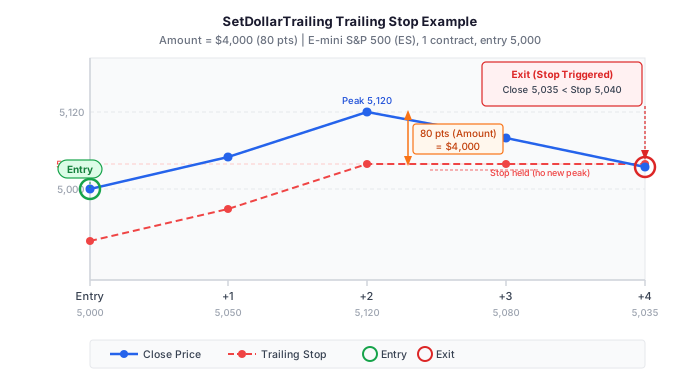
| Bar | Close | Unrealized Profit | Peak Profit | Exit Threshold | Note |
|---|---|---|---|---|---|
| Entry | 5,000 | $0 | $0 | -$4,000 | Initial state |
| +1 | 5,050 | $2,500 | $2,500 | -$1,500 | New profit high, threshold updated |
| +2 | 5,120 | $6,000 | $6,000 | $2,000 | New profit high, threshold updated |
| +3 | 5,080 | $4,000 | $6,000 | $2,000 | No new high, threshold unchanged |
| +4 | 5,035 | $1,750 | $6,000 | $2,000 | Profit $1,750 < threshold $2,000 → Exit |
Unrealized profit = (Close - EntryPrice) × BigPointValue, e.g. bar +2 = (5,120 - 5,000) × 50 = $6,000.
SetPercentTrailing#
SetPercentTrailing sets a percentage-based trailing stop: once profit first reaches the Profit threshold, it tracks the peak profit and exits when profit falls from that peak by more than Percentage%.
The key difference from SetDollarTrailing is that the trailing distance is relative — the higher the profit, the larger the allowable drawdown in dollar terms.
Syntax#
| |
| Parameter | Description |
|---|---|
Profit | Activation threshold (entire position, in currency). The trailing stop does not activate until profit first reaches this level |
Percentage | Maximum allowable drawdown as a percentage of peak profit (0–100). Exit condition: current profit < peak profit × (1 - Percentage / 100) |
Example#
E-mini S&P 500 (ES), 1 contract — activate when profit reaches $2,000, then exit if profit drops 50% from its peak:
| |
Same scenario (ES entry price 5,000, BigPointValue = 50), SetPercentTrailing(2000, 50) behavior:
| Bar | Close | Unrealized Profit | Peak Profit | Exit Threshold (50%) | Note |
|---|---|---|---|---|---|
| Entry | 5,000 | $0 | — | — | Not activated ($0 < $2,000) |
| +1 | 5,050 | $2,500 | $2,500 | $1,250 | First time threshold reached — activated! $2,500 × 50% |
| +2 | 5,120 | $6,000 | $6,000 | $3,000 | New profit high, threshold updated: $6,000 × 50% |
| +3 | 5,080 | $4,000 | $6,000 | $3,000 | No new high, threshold unchanged |
| +4 | 5,035 | $1,750 | $6,000 | $3,000 | Profit $1,750 < threshold $3,000 → Exit |
Note: Before profit reaches the
Profitactivation threshold,SetPercentTrailingprovides no downside protection. It should typically be combined withSetStopLossto control losses in the early stage.
SetDollarTrailing vs. SetPercentTrailing#
SetDollarTrailing | SetPercentTrailing | |
|---|---|---|
| Parameters | Amount (currency amount) | Profit (activation threshold) + Percentage (percent) |
| Trailing distance | Fixed amount, does not grow with profit | Scales proportionally with peak profit — larger profit allows larger drawdown |
| Activates immediately | Yes, no threshold required | No, profit must first reach the Profit threshold |
Per-Contract Mode: SetStopContract#
Amount defaults to the whole-position total. If your strategy holds multiple contracts and you want each contract to have its own independent stop, call SetStopContract before the risk management function:
| |
Call SetStopPosition to switch back to whole-position mode (the default).
Example: 2 ES contracts, each with a 10-point ($500) stop:
| |
Without SetStopContract, SetStopLoss(500) would be a $500 stop for the entire 2-contract position (roughly $250 per contract).
Combined Example#
The following example combines 3 risk management functions to build a moving average strategy with complete risk control:
| |
Exit logic explained:
- Fixed stop loss (SetStopLoss): Active immediately on entry — exits if loss reaches 10 points
- Break-even stop (SetBreakEven): Once profit reaches 8 points, the stop moves to the entry price, making the fixed stop ineffective
- Trailing stop (SetDollarTrailing): Continuously tracks peak profit — exits if profit pulls back 20 points from the peak
- MA exit: Exits when close crosses below the MA, regardless of stop conditions
Whichever exit condition triggers first causes the exit.
Notes#
Intrabar Evaluation#
All 5 functions monitor the position continuously intrabar (not just at bar close), so they can trigger an exit on the same bar as the entry.
Multiple Stops Triggering Simultaneously#
If both SetStopLoss and SetDollarTrailing reach their exit conditions within the same bar, whichever triggers first takes precedence.
Coexisting with Manual Exit Instructions#
Sell / BuyToCover instructions and all 5 risk management functions can coexist — whichever triggers first causes the exit.
Cannot Target a Specific Entry#
All 5 functions apply to every open entry in the strategy — it is not possible to assign different stop parameters to specific entry labels (EntryLabel).
Stop Only Moves in the Favorable Direction#
The exit threshold of SetDollarTrailing only rises as peak profit increases — it does not pull back down if profit retreats.
Signal Scripts Only#
All 5 functions can only be used in Signal scripts — they cannot be used in Indicator scripts.
Reference#
https://www.multicharts.com/trading-software/index.php?title=SetStopLoss
https://www.multicharts.com/trading-software/index.php?title=SetProfitTarget
https://www.multicharts.com/trading-software/index.php?title=SetBreakEven
https://www.multicharts.com/trading-software/index.php?title=SetDollarTrailing
https://www.multicharts.com/trading-software/index.php?title=SetPercentTrailing
https://www.multicharts.com/trading-software/index.php?title=SetStopPosition