Text Drawing#
Text drawing allows you to display trading information and messages on the chart. Common text drawing functions include create and delete, set text content and location, and set appearance.
The usage of text drawing functions mainly involves two actions:
- Create a text object and obtain the
TextID: Use theText_Newfunction to create a text object, which returns the unique ID of this text object, stored in the variableTextID. - Operate on the text object using
TextID: With theTextID, you can perform various operations on the already created text, such as modifying, moving, or deleting it.
| |
Example#
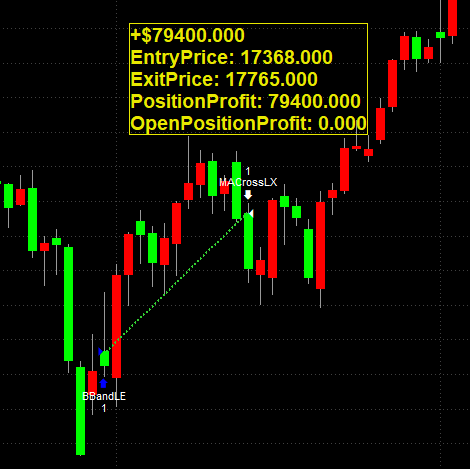
The following code uses text drawing to display the position information (profit, entry price, exit price) of the last closed position on the chart.
| |
The above code will produce output similar to the following:
Common Text Drawing Functions#
The return value of text drawing functions is 0 for success, and -2 for an invalid ObjectID.
Create and Delete#
Text_New(BarDate, BarTime, PriceValue, "Text")#
Creates a text object on the chart at the specified bar and price, and returns the TextID of this text object.
| Item | Description |
|---|---|
BarDate | Numerical, specifies the date of the bar at which the object is to be placed. The date is in YYYMMdd format, where YYY is the number of years since 1900, MM is the month, and dd is the day |
BarTime | Numerical, specifies the time of the bar at which the object is to be placed. The time is in 24-hour HHmm format, e.g., 1300 = 1:00 PM |
PriceValue | Numerical, specifies the vertical position of the text object, corresponding to a value on the price scale of the chart |
Text | The string to be displayed |
| Return value | TextID, the unique ID of this text object |
Text_Delete(ObjectID)#
Deletes the specified text object.
| Item | Description |
|---|---|
ObjectID | The ID of the text object |
Set Text Content and Location#
Text_SetString(ObjectID, "Text")#
Sets the string displayed by the text object.
| Item | Description |
|---|---|
ObjectID | The ID of the text object |
Text | The string to be displayed |
Text_SetLocation(ObjectID, BarDate, BarTime, PriceValue)#
Sets the location of the text object. Parameter formats are the same as Text_New.
| Item | Description |
|---|---|
ObjectID | The ID of the text object |
BarDate | Bar date, YYYMMdd format |
BarTime | Bar time, 24-hour HHmm format |
PriceValue | Vertical position, corresponding to a value on the price scale of the chart |
Set Appearance#
Text_SetColor(ObjectID, TextColor)#
Sets the color of the text.
| Item | Description |
|---|---|
ObjectID | The ID of the text object |
TextColor | Color value, can use RGB(R, G, B) or a color name (e.g., Blue) |
Text_SetBGColor(ObjectID, BGColor)#
Sets the background color of the text.
| Item | Description |
|---|---|
ObjectID | The ID of the text object |
BGColor | Background color value, can use RGB(R, G, B) or a color name |
Text_SetFontName(ObjectID, "FontName")#
Sets the font of the text. Any font installed on Windows can be used.
| Item | Description |
|---|---|
ObjectID | The ID of the text object |
FontName | Font name, e.g., "Arial", "Verdana" |
Text_SetSize(ObjectID, FontSize)#
Sets the font size of the text.
| Item | Description |
|---|---|
ObjectID | The ID of the text object |
FontSize | Font size |
Text_SetStyle(ObjectID, HorizPl, VertPl)#
Sets the alignment of the text object relative to the bar and price.
| Item | Description |
|---|---|
ObjectID | The ID of the text object |
HorizPl | Horizontal alignment. 0: right of the bar. 1: left of the bar. 2: center of the bar |
VertPl | Vertical alignment. 0: below the price. 1: above the price. 2: center of the price |
Text_SetAttribute(ObjectID, Attribute, LogicalExpression)#
Sets the style attribute of the text.
| Item | Description |
|---|---|
ObjectID | The ID of the text object |
Attribute | 0: border. 1: bold. 2: italic. 3: strikethrough. 4: underline |
LogicalExpression | true: enable. false: disable |
Text_SetBorder(ObjectID, LogicalExpression)#
Sets whether the text object displays a border. The border color is the same as the text color.
| Item | Description |
|---|---|
ObjectID | The ID of the text object |
LogicalExpression | true: show border. false: hide border |
Reference#
https://www.multicharts.com/trading-software/index.php?title=Category:Text_Drawing