文字繪製#
文字繪製讓你可以在圖表上顯示交易資訊和訊息。常用的文字繪製函數包含建立和刪除、設定文字內容和位置、設定外觀。
文字繪製函數的用法,主要分成兩個動作:
- 建立文字物件並獲取
TextID: 使用Text_New函數建立文字物件,回傳這個文字物件的唯一 ID,儲存在變數TextID中。 - 使用
TextID操作文字物件: 有了TextID,就可以對已經建立的文字進行各種操作,如修改、移動或刪除。
| |
範例#
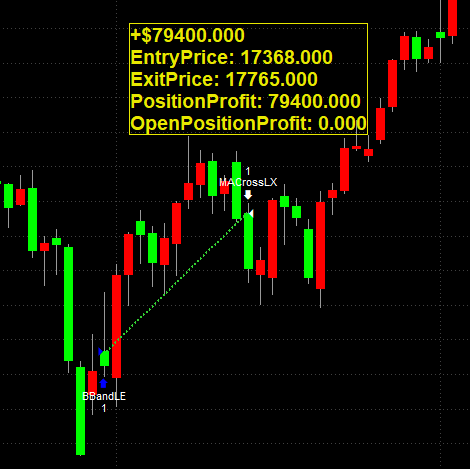
下面程式碼使用文字繪製,在圖表上產生上一次平倉的持倉資訊(獲利、入場價格、出場價格)。
| |
上面的程式碼將產生類似下面的輸出:
常用的文字繪製函數#
文字繪製函數的回傳值如果是 0 代表操作成功,-2 代表 ObjectID 無效。
建立和刪除#
Text_New(BarDate, BarTime, PriceValue, "Text")#
在圖表上建立一個文字物件,位於指定的K棒和價格上,回傳這個文字物件的 TextID。
| 項目 | 說明 |
|---|---|
BarDate | 數值,指定要放置物件的K棒日期。日期以 YYYMMdd 格式表示,其中 YYY 是自 1900 年以來的年數,MM 是月份,dd 是日 |
BarTime | 數值,指定要放置物件的K棒時間。時間以 24 小時 HHmm 格式表示,例如 1300 = 下午 1:00 |
PriceValue | 數值,指定文字物件的垂直位置,對應圖表價格刻度上的值 |
Text | 要顯示的字串 |
| 回傳值 | TextID,代表這個文字物件的唯一 ID |
Text_Delete(ObjectID)#
刪除指定的文字物件。
| 項目 | 說明 |
|---|---|
ObjectID | 文字物件的 ID |
設定文字內容和位置#
Text_SetString(ObjectID, "Text")#
設定文字物件顯示的字串。
| 項目 | 說明 |
|---|---|
ObjectID | 文字物件的 ID |
Text | 要顯示的字串 |
Text_SetLocation(ObjectID, BarDate, BarTime, PriceValue)#
設定文字物件的位置。參數格式同 Text_New。
| 項目 | 說明 |
|---|---|
ObjectID | 文字物件的 ID |
BarDate | K棒日期,YYYMMdd 格式 |
BarTime | K棒時間,24 小時 HHmm 格式 |
PriceValue | 垂直位置,對應圖表價格刻度上的值 |
設定外觀#
Text_SetColor(ObjectID, TextColor)#
設定文字的顏色。
| 項目 | 說明 |
|---|---|
ObjectID | 文字物件的 ID |
TextColor | 顏色值,可使用 RGB(R, G, B) 或顏色名稱(如 Blue) |
Text_SetBGColor(ObjectID, BGColor)#
設定文字的背景顏色。
| 項目 | 說明 |
|---|---|
ObjectID | 文字物件的 ID |
BGColor | 背景顏色值,可使用 RGB(R, G, B) 或顏色名稱 |
Text_SetFontName(ObjectID, "FontName")#
設定文字的字體,可使用 Windows 已安裝的字體。
| 項目 | 說明 |
|---|---|
ObjectID | 文字物件的 ID |
FontName | 字體名稱,例如 "Arial"、"Verdana" |
Text_SetSize(ObjectID, FontSize)#
設定文字的字體大小。
| 項目 | 說明 |
|---|---|
ObjectID | 文字物件的 ID |
FontSize | 字體大小 |
Text_SetStyle(ObjectID, HorizPl, VertPl)#
設定文字物件相對於K棒和價格的對齊方式。
| 項目 | 說明 |
|---|---|
ObjectID | 文字物件的 ID |
HorizPl | 水平對齊。0: K棒右側。1: K棒左側。2: K棒中央 |
VertPl | 垂直對齊。0: 價格下方。1: 價格上方。2: 價格中央 |
Text_SetAttribute(ObjectID, Attribute, LogicalExpression)#
設定文字的樣式屬性。
| 項目 | 說明 |
|---|---|
ObjectID | 文字物件的 ID |
Attribute | 0: 邊框。1: 粗體。2: 斜體。3: 刪除線。4: 底線 |
LogicalExpression | true: 啟用。false: 停用 |
Text_SetBorder(ObjectID, LogicalExpression)#
設定文字物件是否顯示邊框,邊框顏色與文字顏色相同。
| 項目 | 說明 |
|---|---|
ObjectID | 文字物件的 ID |
LogicalExpression | true: 顯示邊框。false: 隱藏邊框 |
Reference#
https://www.multicharts.com/trading-software/index.php?title=Category:Text_Drawing